Twelve cards. Three are actually moving.
Brassdeck holds everything you started on one canvas, shows you the few things genuinely in motion, and keeps the reason you stopped the rest.
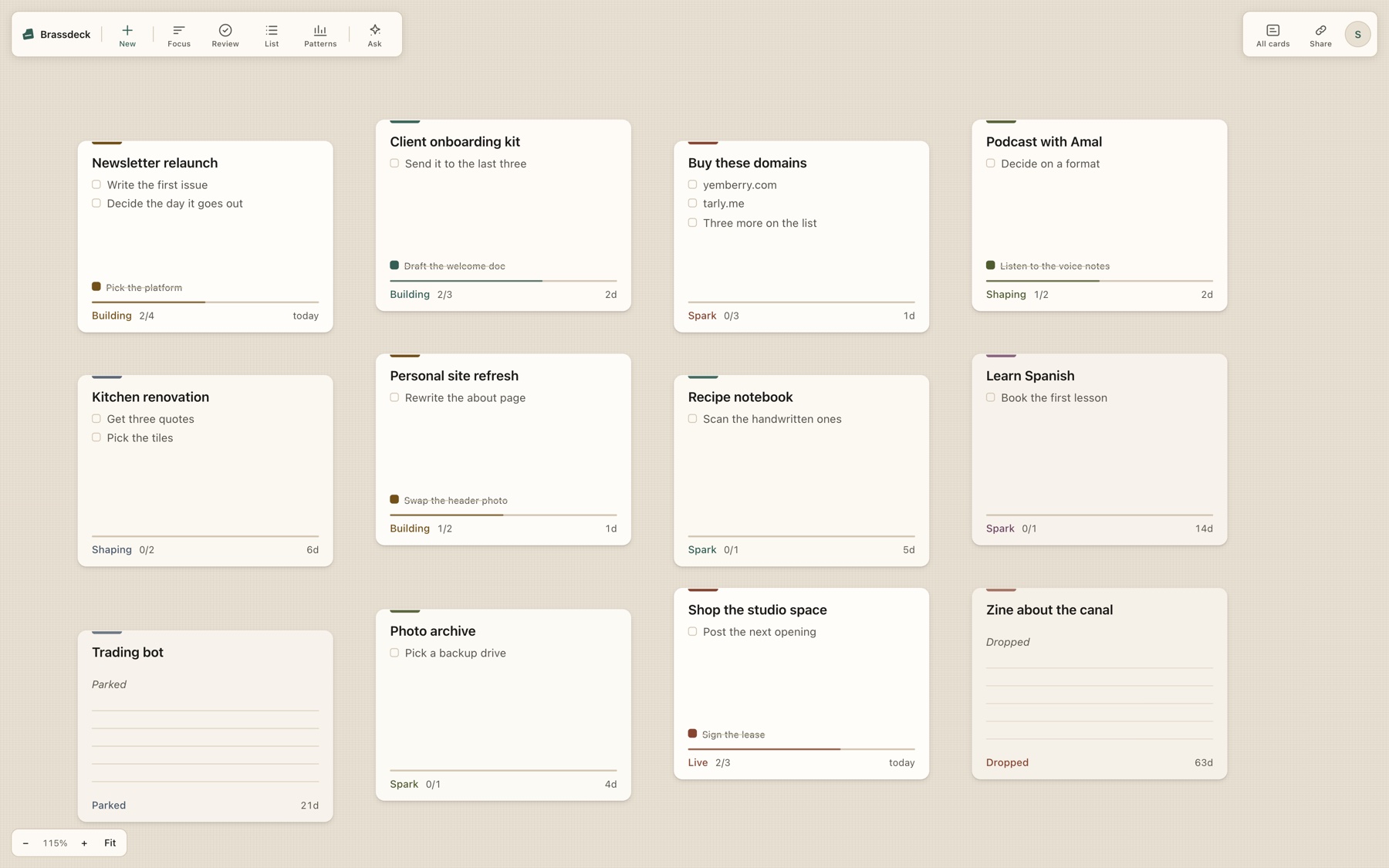
Built for the people who start more than they finish
Tidying your board is not progress.
Every other tool lifts a card to the top the moment you rename it, reorder it, or drag it somewhere neater. So the list flatters you, and the number it shows you stops meaning anything.
Brassdeck keeps a separate clock that moves only when something real happened. A card dragged across the canvas after 147 days still reads 147 days.
An empty canvas.
No inbox, no list of things you owe. Just a surface, and the things you have going on it.
One click makes a card.
It arrives where you are looking rather than at the origin, because a card you cannot find is a card you did not make.
Name the idea.
That is the whole commitment. A card is ONE idea, never a board and never a list.
Write the first step.
A step is one line inside a card. No assignee, no ranking, nothing nested underneath it. Steps are deliberately thin.
The card shows what is LEFT.
Finished steps fold away behind a count, and one line of what was finished stays, because that part feels good.
Set the next step. The clock moves.
Setting a next step, finishing one, changing the stage and parking on purpose all count. Renaming, dragging and looking do not.
Not everything is a card.
A note has no stage and no clock. It is something written down to stop holding it, and it is left out of every count.
A step can say more than you typed.
Write a domain and it tells you whether it is free. Write a video and it carries its views. No new menu, no new icon: the annotation IS the widget.
Tell it once, in a sentence.
It watches overnight and emails you once when it happens, then stops. Listed with a Stop button, so it is never machinery you cannot find.
Ask it, without leaving the canvas.
Same board, same fifteen tools. It streams as it works, and creating a card is proposed rather than performed.
Claude works on the same board.
Brassdeck is the MCP server. Claude reads your cards, ticks a step off, and the card changes underneath you.
Everything you started, in one place.
Views to look at a subset, focus for where your attention is, a deck on your phone, and a share link only when you want one.
The canvas is where things live. These are the questions you ask of it.
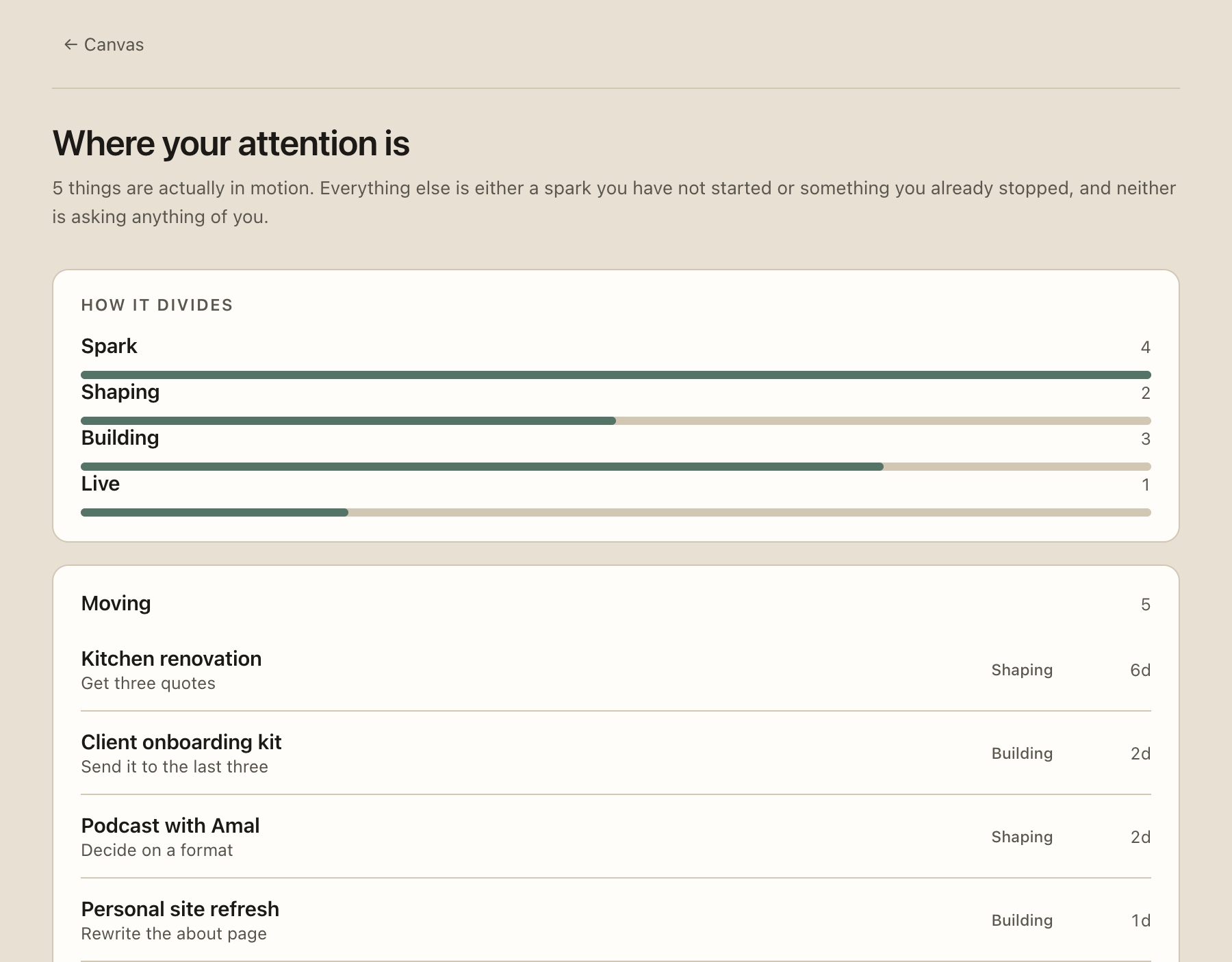
Where your attention is
How the load actually divides right now, and which few things are moving. Sparks are not counted as demands.
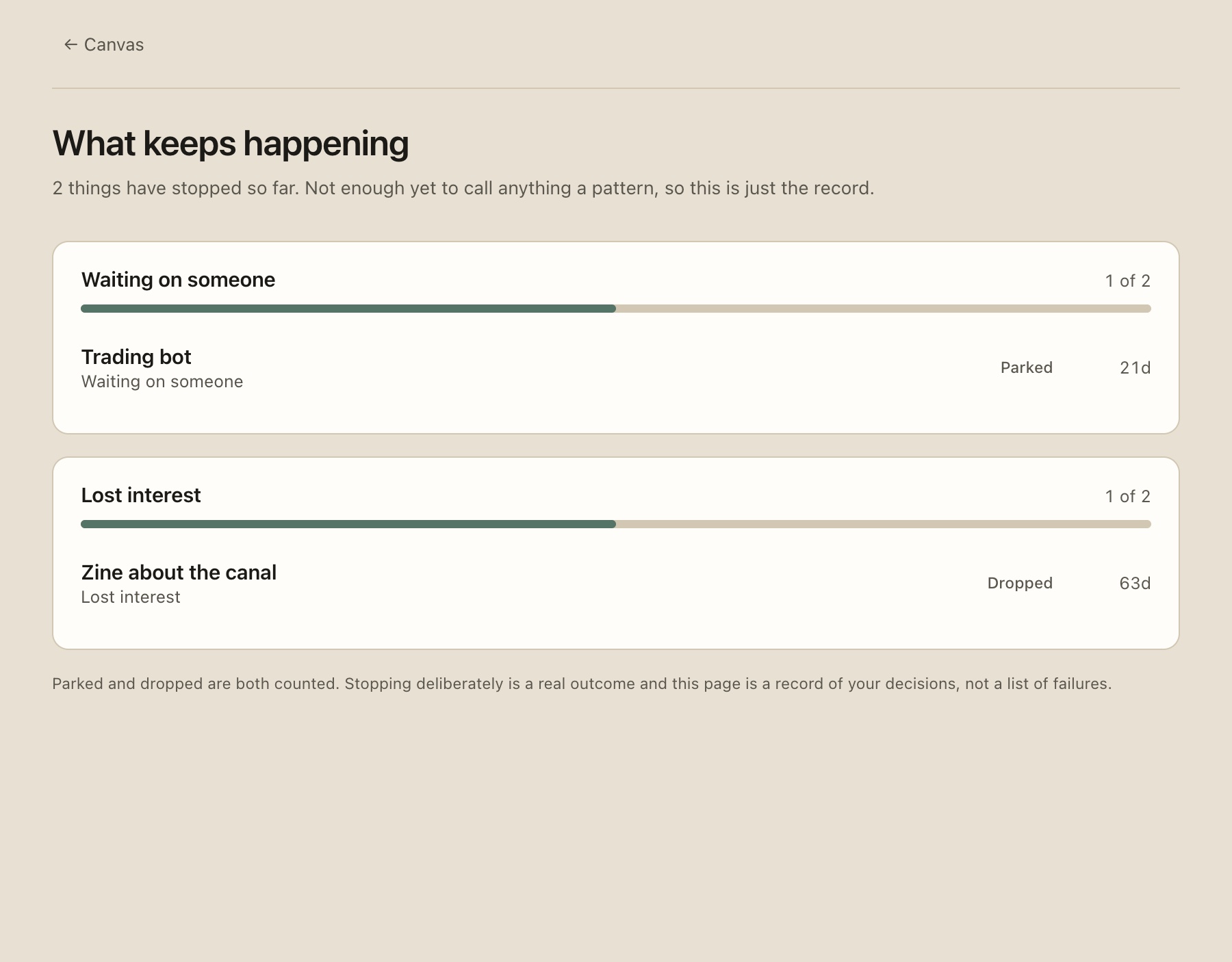
What keeps happening
Why things stop, counted across every stall. It refuses to call fewer than five events a pattern.
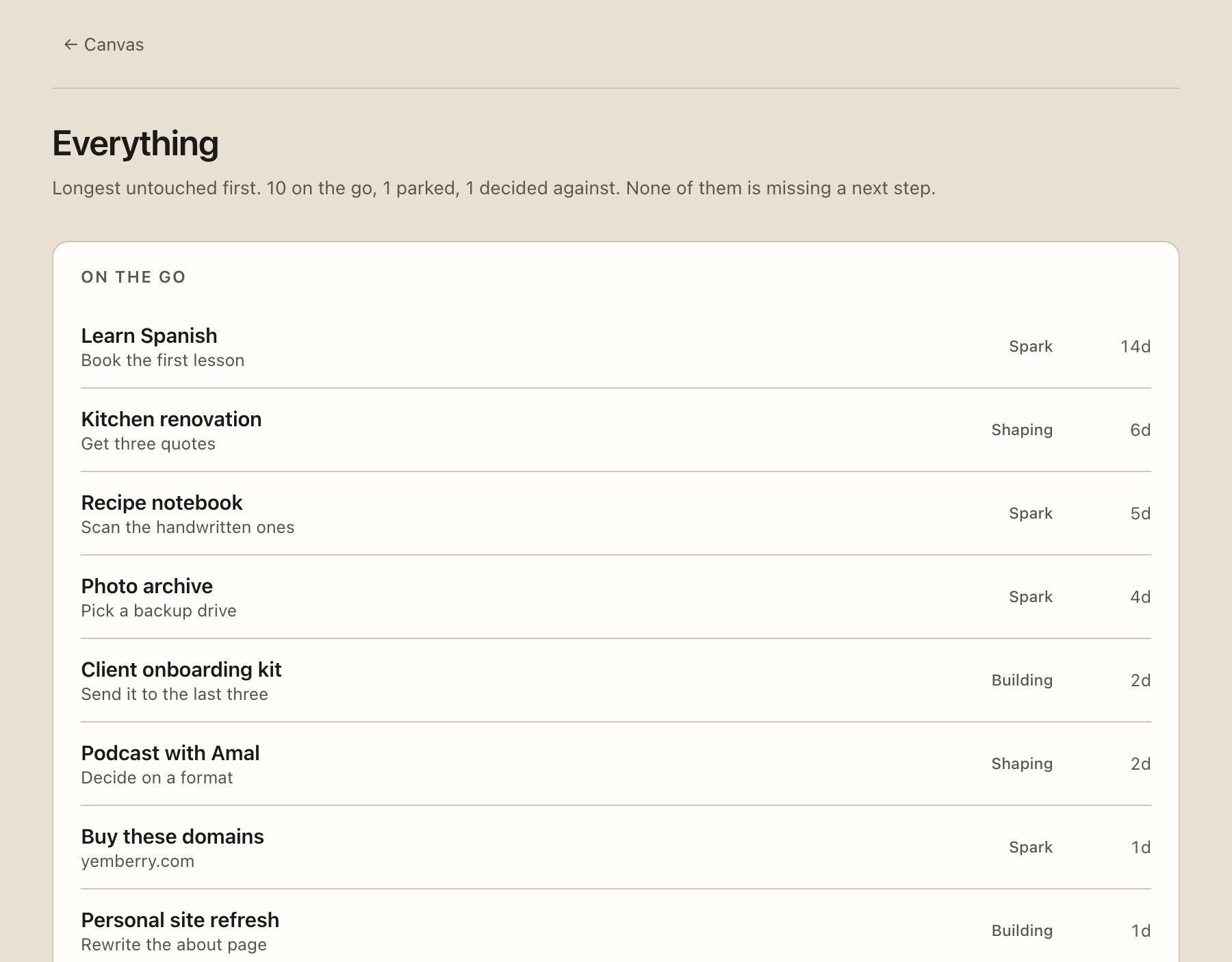
Everything, in order
The whole board as one list, ranked by how long each thing has been sitting untouched.
What is left, and one line of what was finished.
Not a task list. A card carries the smallest set of things that answer one question: is this moving, and what is the next thing.
What is left, not what is done
Finished steps fold away behind a count. A card listing five things you did three weeks ago is reporting history and calling it state.
One line of history, because it feels good
The most recent finish stays visible. One line keeps that feeling. Six turns the card back into an archive.
The stage, in plain words
How far the idea has travelled toward being real, which is a different question from whether you touched it today.
How long since it actually moved
Not since you edited it. Not since you dragged it. The one number in the app that never flatters you.
Four are a journey. Two are exits, not failures.
Spark
A thought, written down so it stops taking up room in your head.
Shaping
Working out what it actually is, before building anything.
Building
Actively being made. The stage that costs you hours.
Live
It exists in the world. Finished, and still worth looking at.
Parked
Deliberately stopped, with a date it comes back. Never goes cold.
Dropped
Decided against, and kept, so the decision survives the idea.
Parked and dropped are left out of every count in the app. Counting them would quietly turn your own decisions back into obligations.
Your board is a place Claude can actually work.
Not a chat box bolted to the sidebar. Brassdeck runs a Model Context Protocol server, so Claude and ChatGPT connect to your board and read and write the same cards you do. Paste one URL. No API key, nothing billed to you.


The connector
Fifteen tools: read the board, open a card with every step, search everything written on it, add steps, tick them off, move a stage. A read-only connection does not even list the ones that write, and each connection gets its own token, so revoking Claude does not sign ChatGPT out.
It is told the vocabulary and the clock rules up front, so it reports what is on the board rather than treating it as a task list.
Any MCP clientbrassdeckThe one inside the app
Same board, same tools, without leaving the canvas. Ask what to pick up, or tell it to write out eight steps and set the next one. It streams, so you can see what it is doing rather than watching a spinner.
Making a card is proposed, never performed. You get a sentence and a yes or no, because an assistant that quietly fills your canvas has stopped being useful.
Automations with nothing to configure
“Tell me when the Bris video passes a thousand views.” That sentence is the whole setup. It watches overnight and emails you once when it happens, and it is listed with a Stop button so it is never machinery running on your behalf that you cannot find.
Views on a video, a domain coming free, or a card that has gone quiet for longer than you said.
Every tool, every input and how to connect is written out on the docs page.
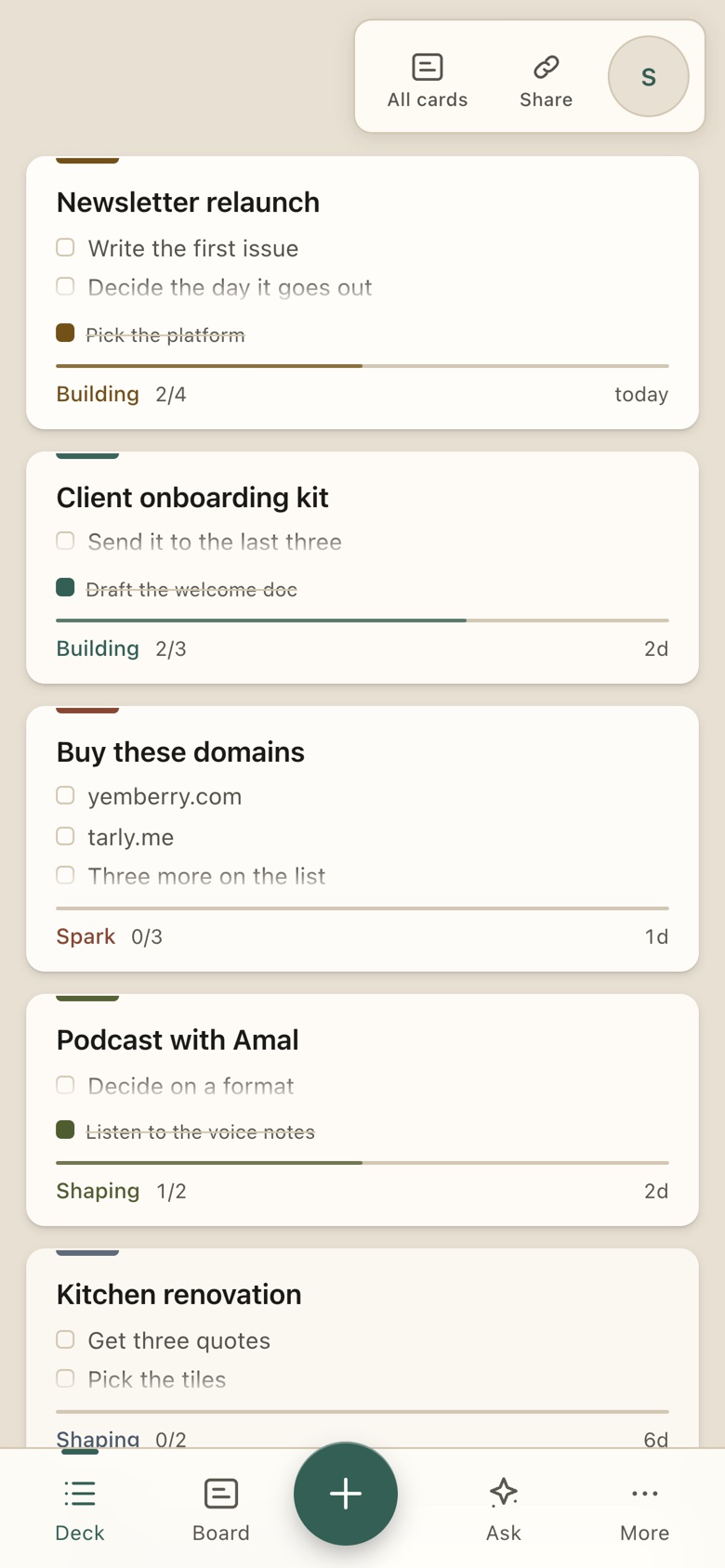
A phone gets the deck, not a shrunken canvas.
An infinite canvas is a desktop idea. Fit a real board onto a 375px screen and you land at twenty per cent, where a card is fifty-six pixels wide.
- 01The same cards and the same editor, as a readable stack.
- 02Ranked so the things asking something of you sit at the top.
- 03The board is one tap away, and it pinches to zoom properly.
- 04Installs to the home screen, opens without browser chrome.
Questions
What is Brassdeck?
Brassdeck is a tracker for everything you started: one canvas, one card per idea, each with its steps, its stage and a clock that only moves when something real happens. It is for people who start more than they finish and want to see which things are actually moving.
Who is it for?
One person, or a small group, with more things going than they can hold in their head. Makers, freelancers, founders, students, anyone with a pile of things they started. It is not a ticketing system for a large team.
Is Brassdeck free?
Yes. Free is 4 cards with 20 steps each and it stays free. Every new workspace gets two weeks of the paid tier with no payment method asked for, and when that ends nothing is deleted or locked. Maker is $8 a month and Studio is $20 a month, per workspace, not per person. Pricing →
How is it different from Trello, Notion or Linear?
Those move work through columns and treat every item as active. Brassdeck has no columns: every card shows how long since it actually moved, tidying the board cannot change that number, and stopping something on purpose is recorded with the reason rather than deleted. Each comparison is written up honestly, including who should stay with the other tool. Read the comparisons →
Does it work on a phone?
Yes. On a phone the canvas becomes a readable deck of the same cards, and you can tick steps, set the next step and write notes. The canvas itself, with the spatial layout, is for a screen wide enough to hold it.
Can I use it with Claude or ChatGPT?
Yes. Brassdeck has a connector that lets an assistant read your board and, if you allow it, work on it: list what is moving, tick a step, set the next step. Every tool it can call is documented in the manual, and a token can be revoked at any time. The connector reference →
You already know what you started.
Put it somewhere that will not turn it into a list of things you owe.